

Incident management automation replaces manual triage, notification, and diagnosis steps with rule-based and AI-driven workflows, and its primary payoff is faster, more consistent resolution with less on-call burnout. Teams that implement it well cut mean time to resolution and reduce the noise that drains responders. This guide covers how the automation actually works, where to start, and how to govern it safely.
TL;DR:
- Automation rules are suitable for high-volume, low-ambiguity tasks, while playbooks and RAG workflows handle complex or unfamiliar incidents.
- Effective incident automation involves five stages, including suspicious alert grouping, telemetry enrichment, confidence scoring, human approval, and knowledge capture.
- Rolling out automation should begin with low-risk, repetitive tasks, using shadow mode testing for at least two weeks to prevent false positives and build trust.
- Integration with observability, ticketing, chat, and security systems is crucial for automation success and security compliance, especially in regulated industries.
- Combining deterministic rules with AI-driven investigation mitigates risks of scope creep, stale playbooks, alert fatigue, permission sprawl, and organizational resistance.
Table of Contents
- What Is Incident Management Automation, Exactly?
- How Incident Management Automation Actually Works
- What Are the Measurable Benefits of Automating Incident Response?
- What Do Real Incident Automation Playbooks Look Like?
- How Do You Roll Out Incident Automation Safely?
- Which Systems Actually Need to Be Integrated?
- What Enterprise Rollouts Actually Teach You
- What Trips Up Most Teams Adopting Incident Automation
- What Metrics Matter Besides MTTR?
- What Role Does AI Actually Play in Incident Automation?
- How Do You Get Teams to Actually Trust the Automation?
- What Security and Compliance Rules Apply to Automated Incident Response?
- Where Incident Automation Is Actually Heading in 2026
- Get Help Rolling Out Incident Automation Without the Guesswork
- Sources
- FAQ
What Is Incident Management Automation, Exactly?
Incident management automation covers three distinct layers, and confusing them is where most rollouts stall. Automation rules are deterministic: if a specific alert fires, run a fixed action, like tagging a ticket or paging a team. Playbooks and runbooks are heavier orchestration sequences that chain multiple steps, call external APIs, and branch on conditions. RAG-based or agentic workflows go further still, letting an AI system pull from historical incidents, documentation, and telemetry to reason about a novel problem rather than follow a fixed script.
The distinction matters for risk management:
- Automation rules suit high-volume, low-ambiguity tasks (status updates, routing, deduplication).
- Playbooks fit repeatable multistep processes where the steps are known in advance.
- Agentic RAG workflows fit investigation of unfamiliar or complex incidents where no fixed script exists.
Microsoft’s Sentinel guidance frames this as layered automation: simple automation rules handle routine incident handling while playbooks manage complex orchestration. Picking the wrong layer for a task is the single most common design mistake teams make early on.
How Incident Management Automation Actually Works
The automation flow runs through five stages, each with its own failure modes.
- Triggers and grouping. An alert or a signal from your monitoring stack fires, and grouping logic decides whether it is a duplicate, a symptom of a known issue, or something genuinely new.
- Enrichment. The system pulls telemetry, deployment history, recent changes, and past incidents with similar signatures into one place, so a human (or an agent) does not start from a blank screen.
- Investigation and confidence scoring. This is where agentic systems earn their keep. Open source platforms in this space can perform structured root cause analysis autonomously, so an engineer sees a draft RCA before they even open a laptop. Confidence scoring matters here: the system should flag how sure it is, not just what it thinks happened.
- Execution. Low-risk fixes (restarting a service, scaling a pod) can run automatically. Anything touching customer data, billing, or production configuration should route through a human-in-the-loop approval gate.
- Knowledge capture. The resolution, the reasoning, and the outcome get written back into a searchable knowledge base for the next incident.
Pro Tip: Route every automated action, even the fully autonomous ones, through the same audit log as manual actions. Six months from now, nobody will remember which fix was a human’s call and which was the system’s, and you will need to know.
What Are the Measurable Benefits of Automating Incident Response?
The clearest benefit is time. Investigation work that used to take an on-call engineer an hour of log-diving can happen in minutes when enrichment and RAG-based investigation run automatically. Open source AI SRE platforms built around multi-agent analysis and knowledge graphs claim substantial reductions in alert noise alongside faster root cause identification, which tracks with what most teams see once duplicate and low-priority alerts stop reaching a human.
Beyond raw speed, the operational benefits stack up:
- Fewer 3 a.m. pages, because grouping and suppression logic filter out noise before it reaches a human.
- Faster, more consistent customer status updates, since templated communications can fire the moment severity is confirmed.
- Better cross-team collaboration, because a shared incident channel and shared context reduce the “who owns this” scramble.
- More engineering time recovered for actual feature work instead of firefighting.
These translate directly into uptime numbers and release velocity, the two metrics that actually get reported to leadership.
What Do Real Incident Automation Playbooks Look Like?
Concrete patterns make this easier to picture than abstract descriptions do.
- Customer-impacting product bug. An error-rate alert fires, automation groups it against recent deploys, auto-creates a Slack or Teams channel, tags the owning team from a service catalog, and posts an initial status update within minutes, all before a human joins the call.
- Infrastructure outage. A node or region health check fails, enrichment pulls recent config changes and dependency maps, blast-radius analysis flags which services are actually affected, and the system offers isolation options (draining traffic, failing over) that a human approves rather than a script that runs unsupervised.
- Security incident. Containment steps trigger automatically (isolating a compromised host, revoking a token), while evidence acquisition runs in parallel. AWS’s prescriptive pattern for this uses separate security and forensics accounts so containment actions can’t accidentally destroy the evidence needed for the investigation.
Each of these follows the same skeleton: trigger, automated context gathering, then a human approval gate before anything irreversible happens.
How Do You Roll Out Incident Automation Safely?
Start small and boring. The highest-value first targets are high-volume, low-risk automations, status changes, ticket routing, deduplication, not the dramatic auto-remediation scenarios that make good demo slides but carry real blast radius if they misfire.
A workable rollout checklist looks like this:
- Scope the first automations to tasks your team already does the same way every time.
- Write playbooks with explicit assumptions and a stated confidence threshold below which the system defers to a human.
- Put human-approval gates on anything touching production data, billing, or customer communications.
- Use role-based access control and dedicated service accounts with the narrowest permissions the automation actually needs, not broad admin access “to be safe.”
- Test with synthetic incidents in staging before pointing automation at real production alerts.
- Track MTTR and automation success rate from week one, so you have a baseline before you scale up.
- Feed every resolved incident back into the knowledge base, including the ones automation got wrong.
Pro Tip: Run your first automated playbook in “shadow mode,” letting it generate recommendations without taking action, for at least two weeks. You will catch more false positives that way than any amount of tabletop testing.
Microsoft’s own guidance on this pattern is blunt about the sequencing: layer automation rules for routine handling and reserve playbooks for orchestration that needs service accounts and RBAC to run safely.
Which Systems Actually Need to Be Integrated?
Automation is only as good as the systems feeding it, and enrichment quality depends on data pipes you set up ahead of time, not during an incident.
- Observability platforms need to surface deployment metadata, not just raw metrics, so automation can correlate an alert to a specific change.
- Ticketing systems need two-way sync with your automation layer, so status updates in one place reflect everywhere.
- Chat platforms benefit from deep links and auto-created war rooms; Slack-native deployment patterns show meaningfully higher adoption because engineers never have to leave the tool they already live in.
- Orchestration runtimes need a clear permission model, ideally the same RBAC and service-account pattern used elsewhere in your environment.
- Secrets management and audit trails are non-negotiable infrastructure, not an afterthought bolted on before an audit.
Teams building this integration layer from scratch often underestimate the ticketing sync piece specifically. A partner like Monstrous Media Group’s API and systems integration work illustrates how much plumbing sits underneath what looks, from the outside, like a simple Slack bot.
What Enterprise Rollouts Actually Teach You
Engineering teams experienced in regulated, high-volume environments such as finance, healthcare, and telecommunications know that an incident automation misfire is not a minor annoyance but a compliance event. That work, including the integration overhaul for TAP Air Portugal, surfaces a consistent pattern: automation succeeds or fails based on integration depth, not on how clever the AI layer looks in a demo.
The practical takeaways are unglamorous but reliable. Staged autonomy, starting with recommendation-only modes before granting execution rights, catches more edge cases than any pre-launch test suite. Senior nearshore teams who understand both the legacy systems and the new automation layer close gaps that a purely offshore or purely automated approach tends to miss. And auditability has to be designed in from day one, because retrofitting it into a system already running in production is far harder than most teams expect.
What Trips Up Most Teams Adopting Incident Automation
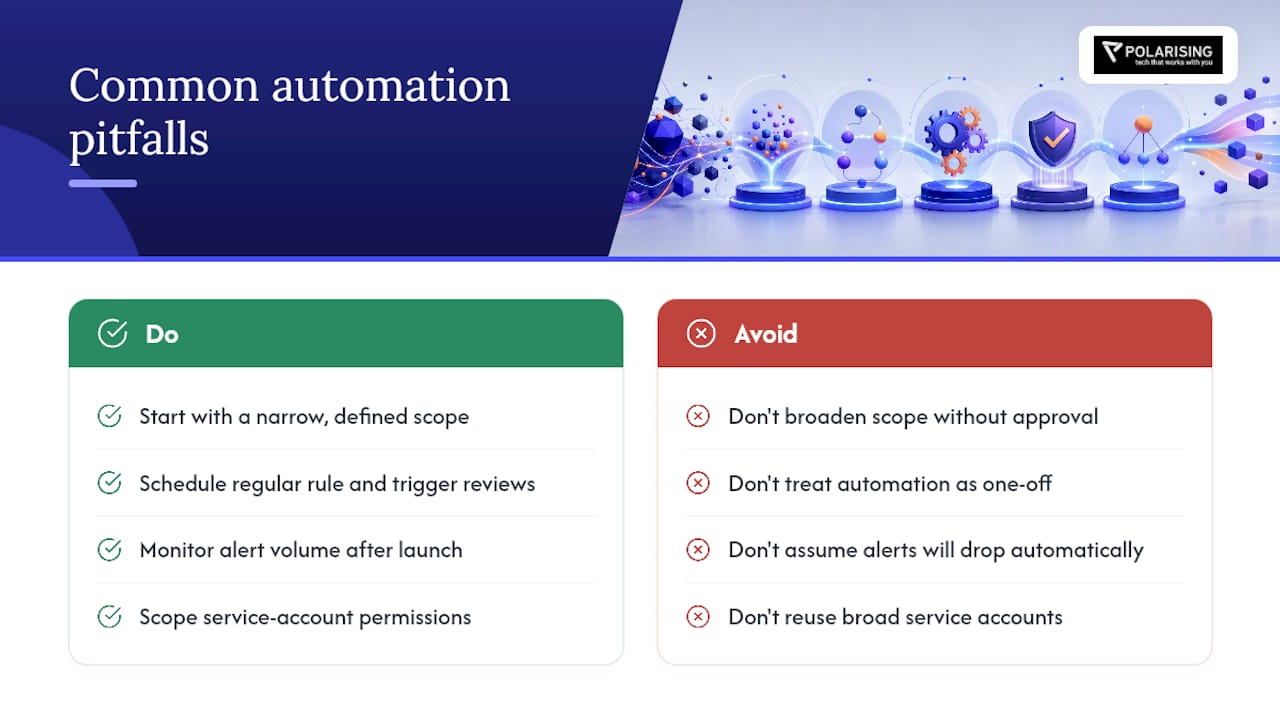
The most common failure mode is not technical, it is scope creep. Teams start with a narrow, sensible automation and then, six weeks in, someone asks it to handle a case it was never designed for. The system either fails silently or takes an action nobody approved, and trust evaporates fast after that.
A second pitfall is treating automation as a one-time build instead of a maintained system. Runbooks go stale when infrastructure changes and nobody updates the trigger conditions. An automation rule written for last year’s deployment pipeline can misfire against this year’s architecture in ways that are hard to diagnose because the rule looks correct on paper.
Alert fatigue can also get worse before it gets better. Poorly tuned grouping logic sometimes duplicates alerts across multiple automated channels instead of consolidating them, which multiplies the noise automation was supposed to eliminate. Teams need to actively watch alert volume in the weeks after launch, not assume the automation is working just because it is running.
Permission sprawl is another quiet risk. Service accounts set up for a pilot automation often get reused for the next one instead of scoped freshly, and within a year a single account has far broader access than any one automation actually needs. That is a security incident waiting to happen inside your incident management tooling itself.
Finally, teams underestimate the organisational resistance. Engineers who have spent years building intuition around specific systems can be skeptical of a script or an agent making calls they used to make themselves. Ignoring that skepticism, rather than addressing it directly, is often what kills adoption more than any technical shortcoming.
What Metrics Matter Besides MTTR?
MTTR (Mean Time to Recovery) gets all the attention because it is easy to graph, but it hides as much as it reveals. A team can improve MTTR by automating the easy incidents while the hard ones still take just as long, and the average looks great while the experience for responders barely changes.
Incident volume trends matter more than they get credit for. If automation is working, the number of incidents that require human escalation should trend down over time, not just the time to close them. A flat or rising escalation count alongside an improving MTTR average usually means automation is handling the easy cases and the underlying reliability problems are untouched.
Resolution quality is harder to measure but worth tracking through recurrence rate: how often does the same root cause reappear within 30 or 90 days? Automation that resolves symptoms without addressing causes will show a low MTTR and a high recurrence rate, which is a warning sign, not a win.
Customer-facing metrics deserve equal weight. Time to first customer communication, and the accuracy of that communication, often matter more to customer satisfaction than raw resolution speed. A fast fix with a confusing or wrong status update can do more reputational damage than a slower fix with clear, honest updates.
On-call health metrics round this out: page volume per engineer, off-hours pages specifically, and voluntary attrition on the on-call rotation. If automation is working, these numbers should be improving alongside MTTR, not just MTTR alone.
What Role Does AI Actually Play in Incident Automation?
AI’s real contribution is context assembly, not magic diagnosis. The strongest agentic systems ingest past incidents, runbooks, and chat history into a vector database so every new investigation starts with team-specific context instead of a generic prompt. That grounding is what separates a useful RAG pipeline from a chatbot guessing at your infrastructure.
Machine learning also earns its place in pattern recognition across large alert volumes, spotting that a cluster of seemingly unrelated alerts across three services actually shares one upstream cause. Humans are slow at this kind of cross-system correlation at scale; models are fast at it, provided they have clean historical data to train on.
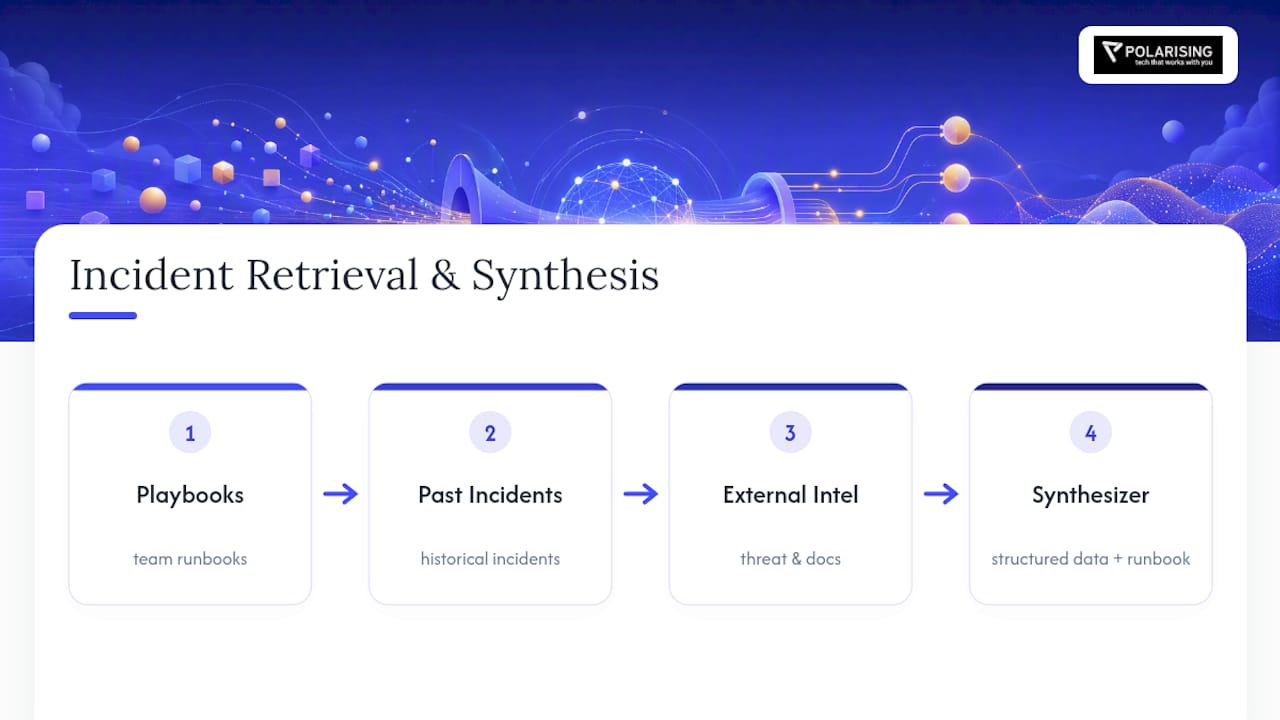
The synthesis step is where the architecture gets genuinely clever. Effective pipelines combine three retrieval lanes, playbooks, past incidents, and external threat or documentation intel, then feed a synthesizer agent that outputs both structured data and a human-readable runbook, with explicit source attribution and defined no-match handling when it cannot find a confident answer. That no-match behaviour matters as much as the successful matches: a system that admits uncertainty is far safer than one that confidently guesses wrong.
None of this replaces human judgment on ambiguous or high-stakes calls. AI in this context is best understood as a research assistant with instant recall of every past incident, not a decision-maker.
How Do You Get Teams to Actually Trust the Automation?
Trust builds slowly and breaks quickly, so sequencing the rollout matters as much as the technology itself.
Start every new automation in observation mode, where it generates a recommendation visible to the on-call engineer but takes no action. Let engineers see, incident after incident, that the system’s suggestions are usually right before you ever let it act unsupervised. Skipping this step is the single fastest way to burn goodwill.
Involve the skeptics early, not as an afterthought. The engineers most resistant to automation are often the ones with the deepest tacit knowledge of what can go wrong, and their objections usually point at real edge cases the automation design missed. Treating their pushback as a design input rather than an obstacle turns your harshest critics into your best testers.
Celebrate specific wins publicly. A vague “automation saved us time” announcement does not move opinion. A specific story, this incident would have taken 40 minutes to triage manually and the system flagged the root cause in three, does. Keep a running log of these moments and share them at team retros.
Finally, give engineers an easy way to override or disable a misbehaving automation without filing a ticket and waiting three days. Nothing kills adoption faster than a team feeling trapped by a system they cannot turn off when it is clearly wrong.
What Security and Compliance Rules Apply to Automated Incident Response?
Automating incident response means automating access to sensitive systems, and that raises the compliance bar rather than lowering it. Every automated action needs the same audit trail a human action would require: who (or what) triggered it, what data it touched, and what the outcome was.
Role-based access control has to be genuinely least-privilege, not a convenient shared service account. A service account built for a status-update automation should not also have the permissions to restart production databases, even if it is technically easier to provision one account for everything.
Data residency and retention rules apply to the knowledge base the automation builds, too. If your incident data includes customer information, the RAG pipeline storing and retrieving that data needs the same governance as any other system holding that information, encryption, access logging, and retention limits that match your regulatory obligations.
For regulated industries specifically, finance and healthcare especially, every automated remediation action needs a documented approval chain, even when the approval itself happens in seconds through a human-in-the-loop gate. Auditors will ask for that chain eventually, and reconstructing it after the fact from scattered logs is far harder than designing it in from the start.
Segregating security and forensics environments follows the same logic AWS recommends for incident containment: keeping forensics accounts separate from production and security tooling prevents containment actions from destroying evidence needed for the investigation. That separation principle extends naturally to compliance: isolate what needs to be audited from what needs to act.
Where Incident Automation Is Actually Heading in 2026
The winning pattern is not choosing rules or AI, it is running both. Deterministic automation rules handle the high-volume routine work, while agentic RAG systems take on the deep investigation that used to eat an engineer’s whole shift. Teams that force one approach to do both jobs end up either too rigid or too unpredictable.
The priority for anyone starting now is institutional memory and integration depth, not flashier models. Supervised autonomy, where the system recommends before it acts, beats full automation on trust and safety every time. Invest in governance and confidence-aware pipelines first; the model choice matters far less than most vendors want you to believe.
— Polarising Team
Get Help Rolling Out Incident Automation Without the Guesswork
Certain firms provide integration layers that help make incident automation trustworthy rather than risky, connecting observability, ticketing, and orchestration systems with the auditability that regulated environments demand, instead of organisations having to stitch it together internally under deadline pressure.

If you are scoping a pilot, AI Pods give you a dedicated, senior delivery team that can stand up a supervised automation pilot on a defined timeline rather than an open-ended internal project competing for engineering bandwidth. For teams whose incident data still lives in legacy systems that were never designed to talk to modern orchestration tools, enterprise integration services close that gap directly. Reach out to scope a technical audit or a pilot, and get a concrete plan for what to automate first and what to leave under human control.
Sources
- Automate incident handling with automation rules – Microsoft Sentinel
- Building an AI-powered incident response workflow in n8n – n8n Blog
- Automate incident response and forensics – AWS Prescriptive Guidance
FAQ
What are the 5 C’s of incident management?
Definitions vary across frameworks, but a commonly cited version covers Communication, Coordination, Control, Containment, and Closure, the stages a team moves through from detecting an incident to formally resolving it. These map naturally onto automation: communication and coordination are the easiest to automate first, while control and containment require the human-in-the-loop gates covered earlier in this guide.
What are the top incident management tools?
The tooling landscape splits between observability platforms, ticketing and orchestration systems like Microsoft Sentinel’s automation rules and playbooks, chat-native incident bots, and emerging agentic RAG platforms for automated root cause analysis. The right stack depends on your existing observability investment and how much of your incident data already lives in a searchable knowledge base.
What is the salary of an incident manager?
Incident manager compensation varies widely by region, industry, and seniority, and no single figure applies globally. Regulated industries like finance and healthcare, along with high-availability sectors like telecommunications, tend to pay a premium for incident management experience given the operational stakes.
What is the difference between ICS and IMS?
Incident Command System (ICS) is a standardized structure, originally built for emergency services, that assigns clear roles and a chain of command during a crisis. Incident Management System (IMS) is the broader term for the tools and processes, including automation rules, playbooks, and agentic workflows, that IT and security teams use to detect, triage, and resolve technical incidents.
How much does it cost to implement incident automation?
Costs depend heavily on how much of your existing telemetry, ticketing, and chat infrastructure is already integrated versus needing to be built from scratch. Current pricing and scoping details for a pilot or technical audit through Polarising are available directly on the site rather than as a fixed published rate.